Amazon Ads Report Analyzer
Upload an Amazon Ads report. Find wasted spend and what to fix next.
Upload once or schedule Amazon's daily report. Todoza turns it into spend, sales, ROAS, wasted-spend analysis and a shareable Performance Report.

Get started
Securely connect your Amazon Advertising account. Todoza will import your data automatically.
Pick your marketplace - we'll give you the exact report link. You do this once: set the report to repeat daily and every following day arrives on its own.
Set up your report one-time
Build it once with a daily schedule - after that Amazon sends each day's report to us and it imports itself. No re-exporting, no reminders.
A
Open Amazon Ads reporting
Open Amazon Ads Reporting
B
Set this report name
Report name
todoza-??????
💡 Using todoza-?????? as the report name lets us match it to your email automatically.
C
Required "Customise columns"
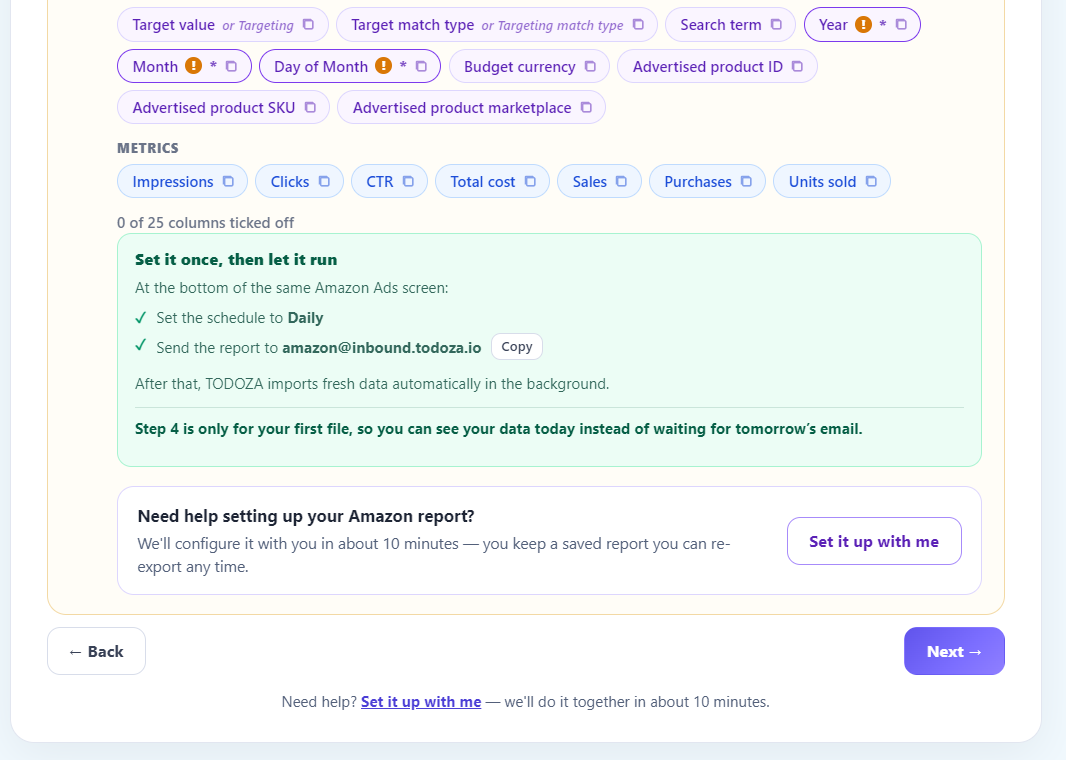
Create a Sponsored Products → Search term report, set Time unit = Daily, and keep the console language on English - we match columns by name. Add every column below; the ones marked * are required and the import fails without them.
Dimensions
Metrics
Need help setting up your Amazon report?
We'll configure it with you in about 10 minutes - you keep a saved report you can re-export any time.
Upload your report
Drag & drop your report here
or CSV, XLSX or TSV · max 20 MBlater: email your reports in
This is what makes it a one-time job. Once your account exists you get your own report token; point the daily schedule at the address below and every report lands here by itself.
Send to
amazon@inbound.todoza.io
Subject
todoza-??????
Got it - check your inbox
We've emailed you a link that sets up your workspace with this report already loaded.
Open it and Waste 4.0 starts on your own numbers, not a demo.
Saved - now set up the report
Amazon takes 20–30 minutes to build the first one. Name it with the token above and send it to
amazon@inbound.todoza.io - we'll match it to your email and send you a link the moment it lands.
Nothing to come back for; the details are in your inbox too.
Amazon Ads Report Analyzer
Import a Sponsored Products search-term report and see spend, sales, ROAS, ACoS, and wasted spend the moment it lands.
Waste leak detected
£3 025.27 burned in selected period across campaigns and search terms once the report imports.
Segment ACOS
Share of spend
Terms to review
Search termSpendSalesROAS
WorstHot Mug - Colour Variants£174.50£221.801.27%
High ACOSStainless Water Bottle - KW£138.60£182.401.32%
1 negative
1 bid ↓
Review Hot Mug - Colour VariantsROAS 9.80 → 2.51 · Spend £79.20 · Sales £198.60 (below target)
Lower bid in weak keyword campaignROAS 3.40 → 2.28 · Spend £62.40 · Sales £148.50 (below target)
Export the Performance ReportROAS 3.55 → 2.43 · Spend £109.80 · Sales £278.30 (below target)
1 negativeReview 10 dashboard recommendationsPotential savings: £54.20 per month.
Inside the analyzer
Report Analyzer turns an Amazon export into analysis you can act on.
Move from a raw report to a working dashboard, and from a working dashboard to a PDF someone else can read without logging in.
Why a dedicated report analyzer?
Exporting a report is easy. Turning it into an answer isn't.
Amazon's console produces the export, but reading it, comparing it to last period, and writing up what changed is the part that repeats every week - and again every time someone outside the account asks.
Import & Performance Report methodology
Todoza separates getting data in from reading it.
Todoza reads an uploaded or emailed Sponsored Products report, matches it to your account, and rebuilds spend, sales, ROAS, ACoS, and wasted spend from it. It does not edit campaigns automatically.
What gets imported
- Sponsored Products search-term reports, daily granularity
- CSV or XLSX upload, up to 20 MB per file, several at once
- Or a standing daily email to your dedicated Todoza inbox
What comes out
- Spend, sales, ROAS, ACoS, and wasted spend at every level
- Previous-period comparison, so decline is visible immediately
- A client-ready Performance Report PDF, on demand
From import to answer
What the report analyzer does
From a raw Amazon report to campaign-level analysis and a Performance Report.
Upload or schedule the import
Upload a CSV or XLSX Sponsored Products search-term report directly, or point Amazon's daily scheduled report at your dedicated Todoza inbox and never touch it again.
Automatic analysis
Every import builds spend, sales, ROAS, ACoS, and wasted spend at account, campaign, ad group, target, and search-term level, with previous-period comparison.
A client-ready Performance Report
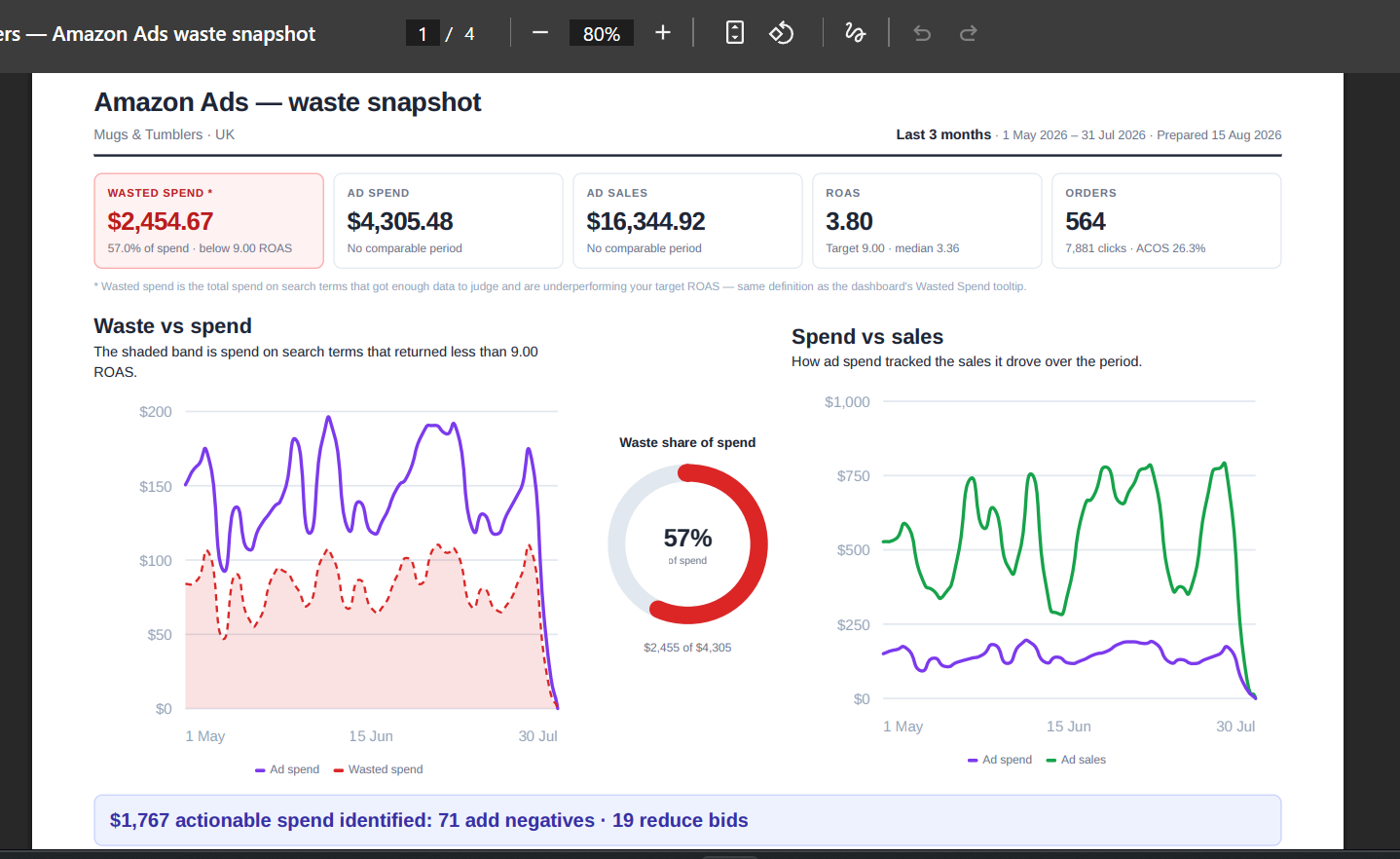
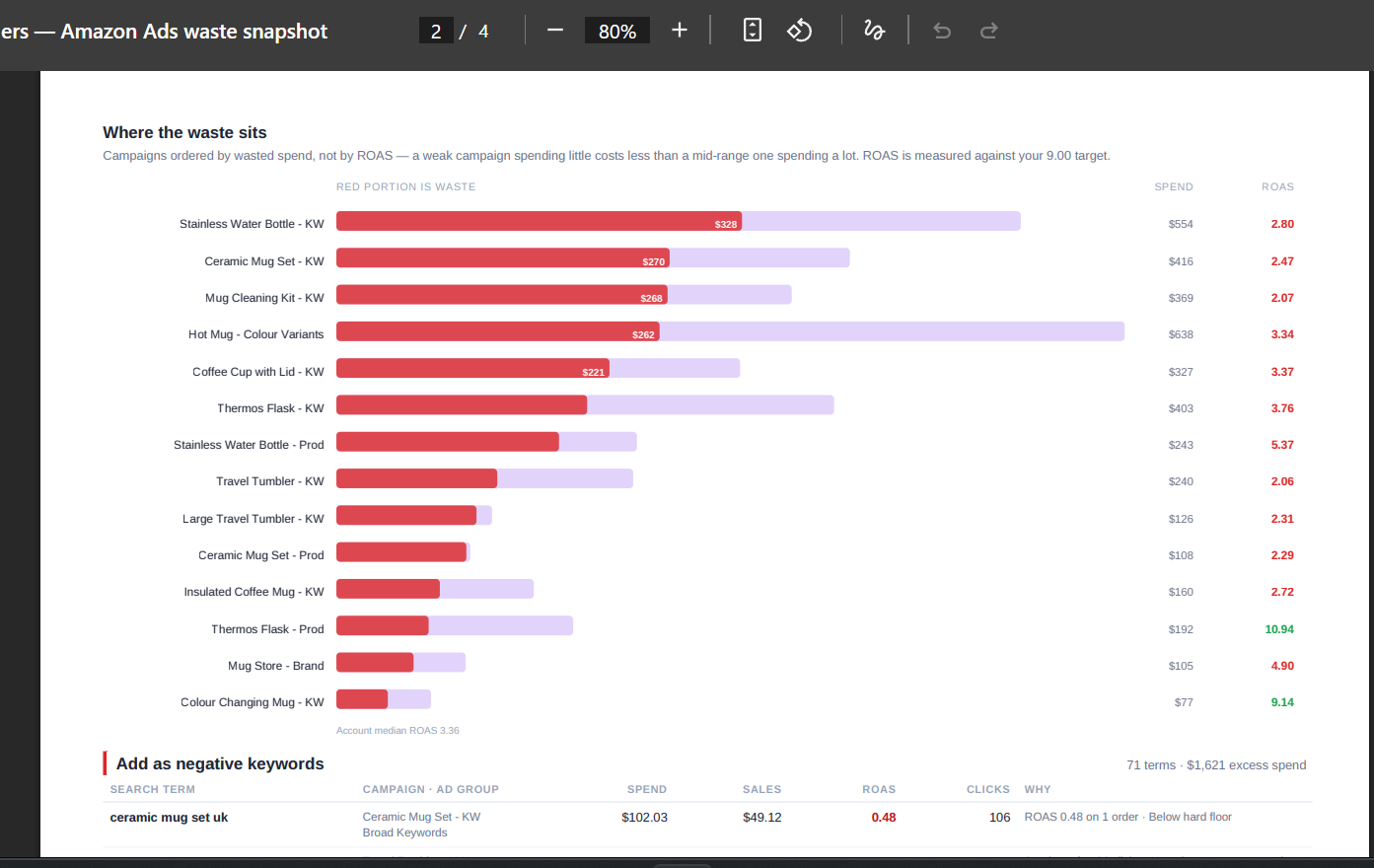
Export a PDF with headline KPIs, trend charts, and the still-open negative-keyword and bid-reduction recommendations - built to hand to someone outside the account.
How it works
Import, review, and export - without leaving the dashboard.
A guided setup gets the first report in within about five minutes; everything after that runs on its own.
- Create the scheduled reportA guided wizard walks through creating a daily Sponsored Products search-term report with the right columns - or Todoza sets it up with you in about 10 minutes.
- Upload the first fileUpload the CSV or XLSX directly so the dashboard has data today instead of waiting for tomorrow's scheduled email.
- Let the email import itselfOnce the schedule is set to Daily, every following report is matched to your account and imported automatically.
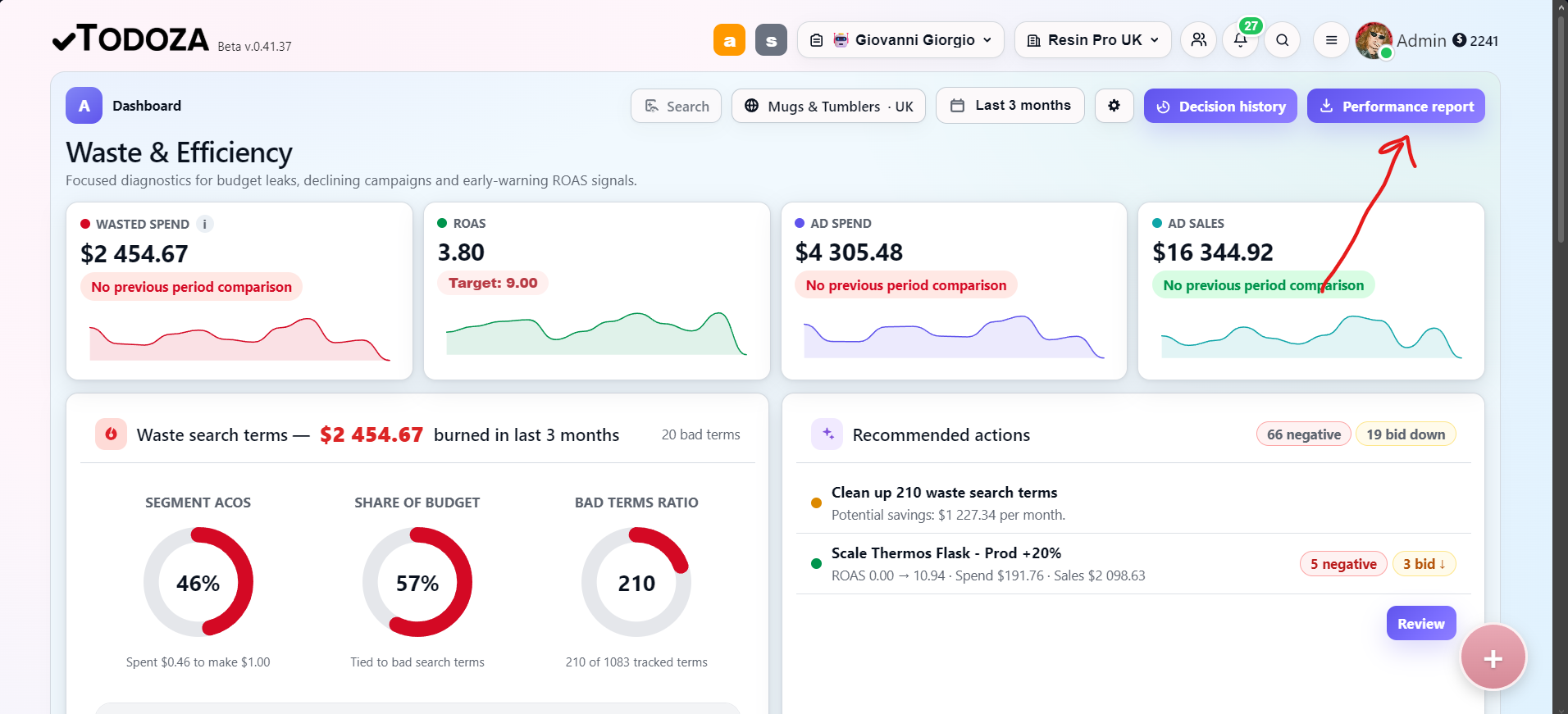
- Review spend, sales, ROAS, and wasteSee the numbers at account, campaign, ad group, target, and search-term level, compared to the previous period.
- Review recommendationsDecide whether to add a negative, reduce a bid, monitor, or explore an opportunity.
- Export the Performance ReportGenerate a client-ready PDF with the same numbers and the still-open recommendations, ready to hand to someone outside the account.
Manual report review vs Todoza
A repeatable import beats another one-off export.
Manual Amazon Ads reporting
- Export a search-term report by hand, every time
- Re-derive spend, sales, ROAS, and waste from scratch each period
- Previous-period comparison needs formulas and repeated cleanup
- Sharing performance with a client means building a deck or a doc by hand
- Malformed exports or missing columns fail silently
Todoza Report Analyzer
- Upload once, or schedule a daily email that imports itself
- Spend, sales, ROAS, ACoS, and wasted spend rebuilt automatically
- Previous-period comparison built into every view
- One-click client-ready Performance Report PDF
- Every import logged, with skipped rows itemized by reason
Read-only analysis
Todoza analyses imported reports and does not change campaigns automatically.
Upload or scheduled email
Import by hand once, or set a standing daily report and forget it.
Built for many accounts
Role controls and marketplace filters support teams, agencies, and brand owners.
Pricing
Simple plans. Real savings.
Compare monthly and yearly billing
Hatchling
For trying Todoza
£0/mo
Free forever
- Up to £500/mo Amazon Ads spend
- 1 marketplace
- Full Cleanup Plan recommendations
- 10 Apply via API actions / month
- Daily Amazon Ads sync
- 90 days of history
Most popular
Waste Hunter
For growing Amazon sellers
£29/mo
Billed monthly
- Up to £2,500/month ad spend
- Report imports up to 3× daily
- Cleanup Plan
- Alerts, exports & assignments
- Full history
- 2 team members
Todozavr bonus
Addressed as "Dear Fearless Waste Hunter"

Todozavr Royalty
Unlimited usage. Maximum glory.
£59/mo
Billed monthly
- Everything in Waste Hunter
- Unlimited ad spend
- Unlimited marketplaces
- Unlimited report imports
- Unlimited team members
Royal treatment
- Crown on your avatar 👑
- Addressed as "Your Most Honourable and Generous Majesty"
- Todozavr postcard
- Thousands of thank-yous
Turn your next Amazon Ads export into a client-ready Performance Report.
Upload a report or schedule the daily email, then export a shareable snapshot of performance the moment you need one.